aimeGeo · Help center
Create content with your familiar AI Agent
Turn a website, product or project into titles, summaries, covers and useful content.
Updated
Prepare a brief
- Provide the project name, website, audience, features and use cases.
- Add verifiable public sources and separate facts from open questions.
- Choose a topic, destination platform, tone, length and content type.
You can use tools such as Codex, Claude Code, DeepSeek, Doubao, ChatGPT, Gemini, Cursor, Trae, WorkBuddy and Kimi to prepare content. External Agent collaboration is separate from configured built-in automation; listing a tool does not mean it has a built-in driver.
Save content in aimeGeo
- Ask the Agent for facts and unresolved questions before drafting.
- Choose Add article and enter a title, summary, category and Markdown body.
- Add images through the image or link controls, then inspect the actual preview.
- Choose text/images or video. Save real video material and a description for video content.
- Save and reopen the article to verify the result.
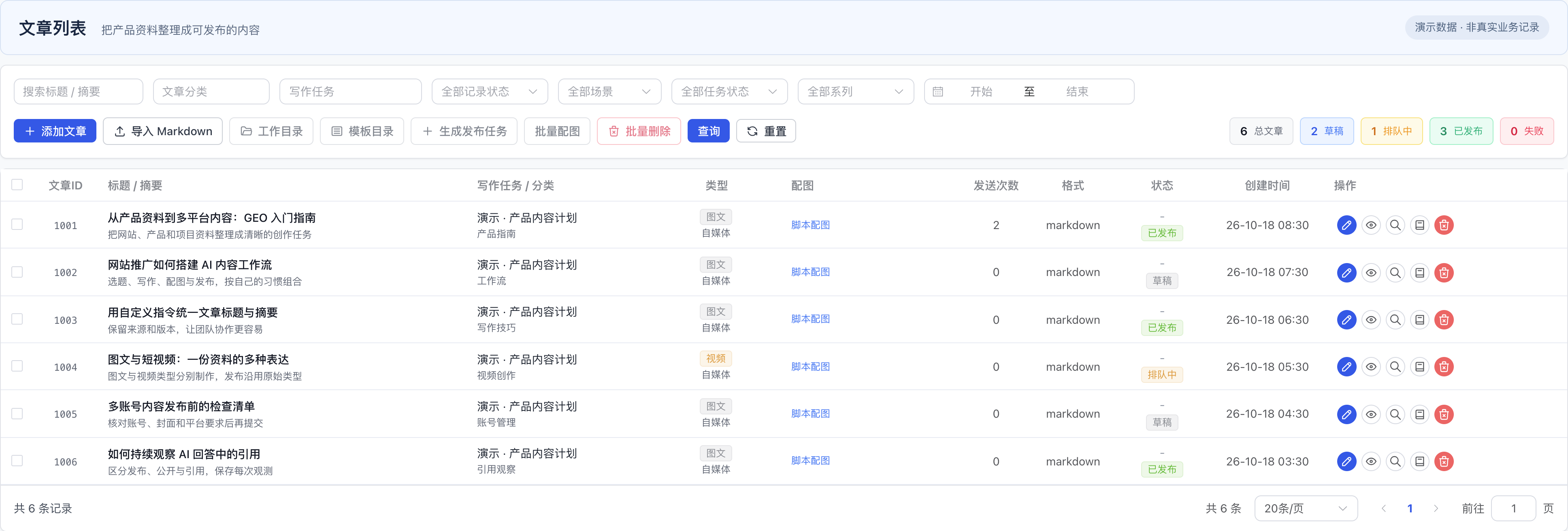
These are fictional examples in the real product interface. See cover generation for image choices.
Content prompt
Create useful GEO content for [project, URL and sources].
Audience and problem: [details]. Platform and format: [details].
First separate verified facts from questions. Then provide a title, summary, tag suggestions,
Markdown body or video script, cover copy and sources.
Give practical steps and limitations without inventing reviews, metrics or citation results.